


Key Takeaways
- Turn on MFA everywhere (email, cloud apps, admin tools, remote access) and review privileged access monthly.
- Standardize secure endpoints: encryption, rapid patching, screen-locking, and centrally managed endpoint protection.
- Use secure remote access with tight scope (app-level access, device checks, logging); don’t rely on a VPN alone.
- Reduce blast radius with least-privilege access, data classification, and controlled sharing/downloads.
- Make password management and credential sharing safe for remote teams—then reinforce with MFA and training.
- Train remote employees and contractors to stop phishing, impersonation, and fraudulent payment requests—and reward fast reporting.
- Document remote-work policies, incident-response steps, and vendor rules so problems are contained quickly.
Introduction
Remote work security refers to the policies, technologies, and practices businesses use to protect employees, company devices, business applications, and sensitive information when work happens outside a traditional office. It includes controlling who can access company systems, securing devices and internet connections, protecting passwords and confidential data, and ensuring employees know how to recognize and report security threats. Without these safeguards, a compromised account, an unsecured device, or a phishing email can expose business information, disrupt operations, and cause financial and reputational damage.
Securing remote work requires layered controls: enforcing multifactor authentication (MFA), using secure and managed devices, limiting access to only what employees need, providing security training, establishing secure remote connections, and maintaining a clear incident-response process. For most organizations, remote work security is a shared business responsibility across leadership, IT, HR, and operations—not just an IT checkbox—because distributed work touches hiring, onboarding, devices, apps, and how sensitive data is handled day to day.
Remote Raven supports businesses with distributed teams—whether you hire remote talent, work with virtual assistants, or run a hybrid model. The key point is simple: remote work isn’t the main security risk. Most threats come from how you manage identities, devices, networks, applications, vendors, and data.
Remote work security goal
|
Remote work security goal |
What “good” looks like |
Fastest high-impact move |
|
Stop account takeovers |
MFA + strong identity controls + fast offboarding |
Require MFA on email and core SaaS today |
|
Reduce device-driven risk |
Encrypted, patched, managed endpoints with endpoint protection |
Inventory devices and enforce auto-updates |
|
Limit data exposure |
Least-privilege access + secure sharing + logging |
Review permissions on file storage and finance tools |
What Are the Biggest Security Risks of Remote Work?
Remote work security risks usually come from a mix of threats, vulnerabilities, and missing controls:
- Threat: Something that can cause harm (for example, phishing, credential theft, malware).
- Vulnerability: A weakness the threat can exploit (for example, reused passwords, unpatched endpoints, overly broad access).
- Control: A safeguard that reduces likelihood or impact (for example, MFA, patching, least privilege, monitoring, training).
|
Risk area |
How it shows up in remote teams |
Business impact |
Primary controls |
|
Phishing & social engineering |
Fake invoices, “CEO” impersonation, malicious links sent via email/chat |
Fraudulent payments, credential theft, malware |
MFA, training, reporting process, email security |
|
Stolen credentials / weak authentication |
Password reuse across personal and work accounts; weak recovery |
Account takeover and data access |
MFA, password manager, SSO, access reviews |
|
Unpatched or unmanaged devices |
BYOD laptops without encryption/updates; outdated browsers |
Malware, ransomware, data leakage |
Endpoint management, patching SLAs, encryption |
|
Insecure home networks / public Wi‑Fi |
Default router passwords, old firmware, open networks while traveling |
Session hijacking, credential theft, privacy exposure |
Remote access rules, device hardening, secure connectivity |
|
Excessive access privileges |
Former contractors still have access; one login can “see everything” |
Large-scale data exposure |
Least privilege, RBAC, JML (joiner/mover/leaver) process |
|
Shadow IT |
Unapproved file-sharing, messaging, AI tools, personal email |
Data sprawl and audit gaps |
Approved app list, DLP where appropriate, training |
|
Lost devices / accidental exposure |
Laptop left in car; files synced locally; screens visible in public |
Confidentiality breaches |
Full-disk encryption, remote wipe, privacy practices |
|
Third-party & staffing provider risk |
Vendors/assistants need access to systems; unclear boundaries |
Supply-chain incidents, data mishandling |
Due diligence, scoped access, contracts, monitoring |
|
Delayed detection & reporting |
Remote staff unsure who to contact; “I thought it was nothing” |
Incidents expand before containment |
Clear escalation path, logging/alerts, response playbooks |
What Do the Financial Consequences of a Breach Look Like?
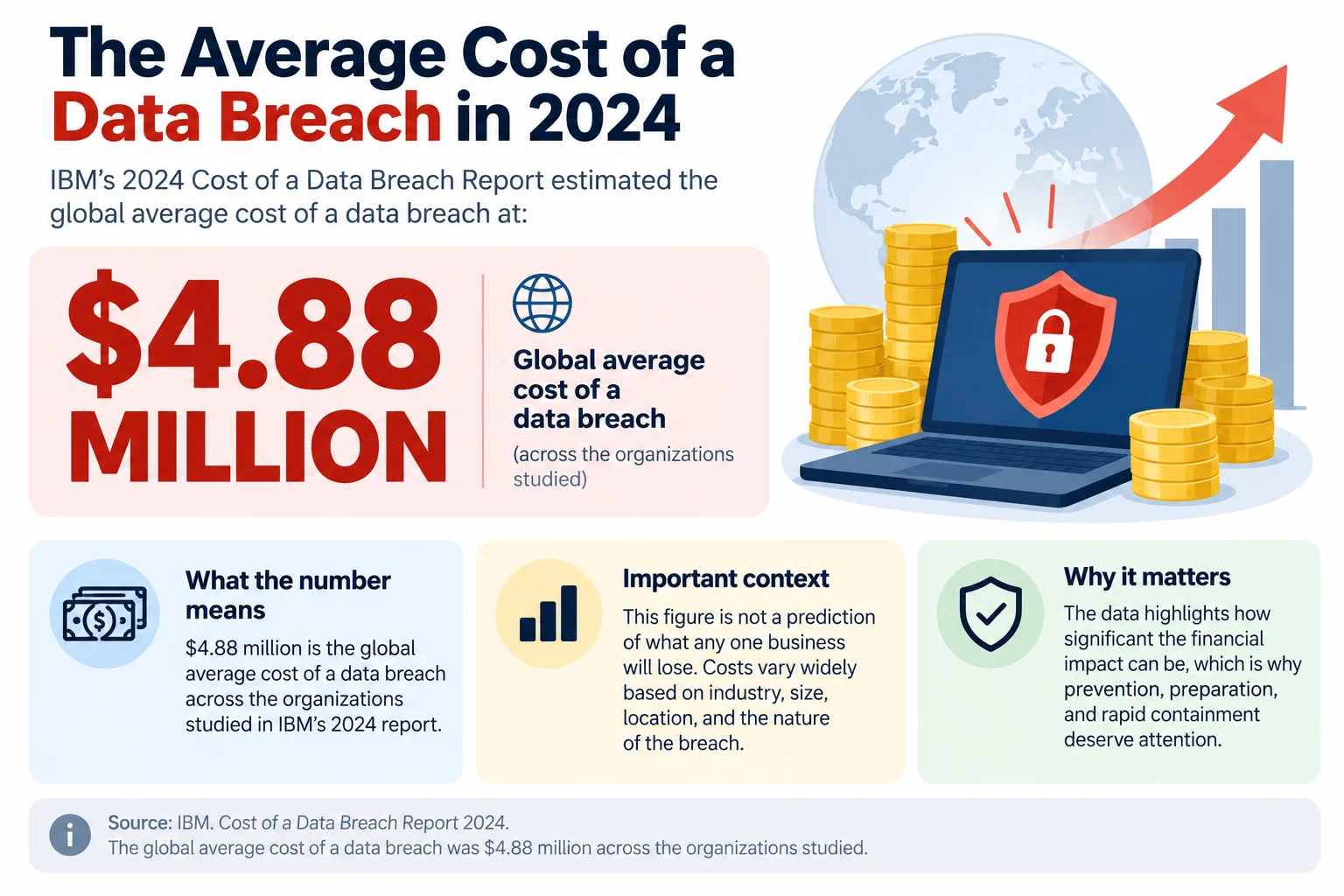
The financial impact can be substantial. IBM’s 2024 Cost of a Data Breach Report estimated the global average cost of a data breach at $4.88 million across the organizations studied. That figure is not a prediction of what any one business will lose, but it illustrates why prevention, preparation, and rapid containment deserve attention. (Source: https://www.ibm.com/reports/data-breach)
The scale of cyber-enabled crime is also significant. The FBI’s Internet Crime Complaint Center recorded $12.5 billion in reported losses in its 2023 Internet Crime Report. These figures reflect complaints reported to the FBI, not every incident or every loss, but they show the potential business consequences of fraud and cybercrime. (Source: https://www.ic3.gov/Media/PDF/AnnualReport/2023_IC3Report.pdf)
Use these numbers as planning context: your real risk depends on your industry (healthcare, finance, legal, etc.), the sensitivity of data handled by remote employees/contractors, and how much access your remote workforce has. Remote Raven typically fits into the conversation when organizations need a workable security baseline that supports productivity—not a complex enterprise stack.
1. Enforce Multifactor Authentication and Strong Identity Controls
What to do: Require MFA for email, file storage, collaboration tools, financial platforms, admin consoles, and any remote access entry point. Eliminate shared accounts, enforce unique credentials, and protect privileged accounts (admins) with stronger authentication and tighter session controls.
Why it matters: Passwords alone are easy to steal through phishing, reuse, or credential leaks. MFA makes a stolen password far less useful. Strong identity controls also reduce the “silent risk” of old accounts and lingering admin access after role changes or offboarding.
How to Implement:
- Create an application inventory (email, CRM, accounting, HRIS, project tools, cloud admin portals) and set a deadline to enable MFA everywhere.
- Adopt single sign-on (SSO) where appropriate to centralize access and offboarding.
- Review privileged access monthly and remove admin rights that aren’t required.
- Document secure account recovery so attackers can’t exploit weak “reset” processes.
How this may apply: If you use Remote Raven for managed IT or cybersecurity support, identity controls and consistent onboarding/offboarding can be built into day-to-day operations (with client approval and clearly defined responsibilities).
2. Secure Company Devices and Enforce Endpoint Protection
What to do: Standardize endpoint security for remote workers: full-disk encryption, auto-locking screens, secure configurations, rapid patching, and centrally managed endpoint protection. Require remote wipe for lost/stolen devices where available.
Why it matters: A compromised endpoint can capture passwords, hijack sessions, sync infected files, or leak customer data. The more distributed your workforce is, the more important a consistent device baseline becomes.
How to implement:
- Maintain a device inventory (who has what, OS version, encryption status, last patch date).
- Define BYOD rules clearly: what’s allowed, what’s not, and what security controls must be in place.
- Block or limit access from devices that don’t meet minimum standards (for example, unsupported OS versions).
- Restrict local admin privileges and prevent unauthorized software installs where feasible.
How this may apply: Remote Raven’s managed IT services may be relevant if you need ongoing help desk support, patch coordination, device setup, and consistent endpoint standards for remote employees and virtual assistants.
3. Use Secure Remote Access and Protected Work Environments
What to do: Use approved, encrypted remote access methods and scope access to the minimum needed. Combine access controls (who), device posture checks (from what), and logging/monitoring (what happened) instead of treating remote access as an all-or-nothing network tunnel.
Why it matters: Secure remote access is where identity, devices, networks, and applications intersect. A VPN can encrypt traffic, but it does not automatically prevent over-broad access, compromised endpoints, or stolen credentials. Zero-trust approaches reduce risk by granting access per user/device/app context rather than “once connected, everything is reachable.”
How to implement:
- Decide which resources need remote access (apps, file shares, admin portals) and remove everything else from remote exposure.
- Require MFA for all remote access methods, especially administrative sessions.
- Log remote sessions and review alerts for impossible travel, unusual locations, and risky sign-ins.
Secure cloud workstations (Virtual Desktops) can strengthen remote work cybersecurity by keeping apps and data inside a managed desktop environment—useful for remote staffing, virtual assistants, contractors, and employees who shouldn’t store data locally. This can reduce data sprawl on personal devices and simplify standardization when configured correctly.
Limitations to plan for: Virtual desktops still require strong identity controls (MFA), correct configuration, patching, session timeouts, and endpoint security on the user’s local device. A compromised account or misconfiguration can still create risk.
How this may apply: If you’re evaluating virtual desktops for a distributed team, Remote Raven’s information on virtual desktop and security can help you understand how a controlled workspace approach may fit your remote work model.
NIST’s guidance on enterprise telework, remote access, and bring-your-own-device security emphasizes that remote access should be designed around the organization’s systems, users, and risk—not treated as a single tool or setting. (Guidance: https://nvlpubs.nist.gov/nistpubs/SpecialPublications/NIST.SP.800-46r2.pdf)
4. Protect Home Networks and Set Rules for Public Wi-Fi
What to do: Give remote staff simple, enforceable home-network and travel-network rules: update router firmware, use strong Wi‑Fi passwords, avoid default router admin credentials, and separate guest networks when possible. Restrict sensitive work on open public Wi‑Fi unless approved protections are in place.
Why it matters: Remote employees work from networks you don’t control. Weak home network settings and untrusted public networks increase exposure to credential interception, session hijacking, and privacy risks.
How to implement:
- Publish a one-page “secure home Wi‑Fi” standard (firmware updates, WPA2/WPA3, strong passphrase, router admin password).
- Create a travel checklist (hotspots, screen privacy, avoiding unknown USB charging, reporting rules).
- Provide an approved remote access method and enforce it consistently.
How this may apply: Remote Raven can support practical remote workforce security by helping businesses translate security requirements into repeatable onboarding for remote employees and contractors.
5. Apply Least-Privilege Access and Protect Sensitive Data
What to do: Apply role-based access control (RBAC) and least privilege so people can only access what they need, when they need it. Classify sensitive data and enforce secure storage and sharing rules (including external sharing settings).
Why it matters: Least privilege limits the damage from compromised accounts and honest mistakes—especially in distributed teams where access often accumulates over time.
How to implement:
- Map roles to systems: HR should access HR records; finance should access financial systems; contractors should have time-bound access.
- Restrict downloads/exports for high-risk datasets where feasible (for example, payroll, healthcare information, or legal case files).
- Review access after role changes and immediately upon termination/offboarding.
Examples: HR records (PII), financial data (bank details), customer information (contracts, billing), healthcare information (PHI), and confidential business documents (pricing, strategy) typically need tighter controls than general project files.
6. Strengthen Password Management and Prevent Credential Reuse
What to do: Require unique passwords for every business account, prohibit password sharing in chat/spreadsheets, and use a password manager to store and share credentials safely when sharing is truly necessary. Reinforce password management with MFA—not instead of MFA.
Why it matters: Credential reuse turns a single password leak into multiple compromises. Password managers reduce “human memory pressure” and make strong, unique passwords feasible for remote teams.
How to implement:
- Set a password standard (unique, long passphrases) and create a safe process for shared access (shared vaults, role-based sharing).
- Define procedures for suspected compromise (reset, revoke sessions/tokens, review logs, notify stakeholders).
- Disable insecure sharing workarounds and replace them with approved methods.
How this may apply: Remote Raven lists NordPass password management among its service offerings; businesses should confirm the available features and deployment scope during an evaluation.
7. Train Remote Employees to Recognize Cyber Threats
What to do: Provide ongoing, role-specific training for remote employees, contractors, and virtual assistants. Focus on phishing, impersonation, suspicious attachments, fraudulent payment instructions, and requests for sensitive information.
Why it matters: Remote employees make independent decisions without the benefit of “overhearing” office conversations or quickly checking with a colleague. Training reduces both click-through risk and the time it takes to report something suspicious.
How to implement:
- Train during onboarding, then reinforce quarterly with short modules and realistic examples.
- Run light-touch simulations (where appropriate) and coach rather than blame.
- Publish a “reporting first” rule: when in doubt, report immediately.
How this may apply: When you hire remote talent through Remote Raven, their dedicated Operations team helps each Raven build secure habits from day one. Ravens also receive ongoing email reminders with short videos on how to identify phishing, impersonation, and other cyber threats.
8. Establish Clear Security Policies and Incident-Response Procedures
What to do: Write remote-work security policies that are specific enough to follow: acceptable use, approved devices, data handling, software installation rules, confidentiality, physical privacy, and offboarding. Pair policies with incident-response playbooks for common remote scenarios (lost device, suspected phishing, account compromise).
Why it matters: Policies reduce ambiguity; incident-response procedures reduce damage. In distributed teams, confusion about “who to tell” can be the difference between a contained event and a prolonged incident.
How to implement:
- Create a single reporting channel and a backup channel (for example, a hotline + an email alias).
- Document first-response steps: report quickly, preserve evidence, follow containment guidance, and document actions taken.
- Clarify that notification obligations and deadlines depend on applicable laws, contracts, jurisdictions, and the type of data involved.
CISA’s secure telework guidance also provides a useful foundation for establishing practical safeguards for employees working outside the traditional office. (Guidance: https://www.cisa.gov/resources-tools/resources/secure-telework)
9. Evaluate Vendors and Use Managed Security Support Where Needed
What to do: Vet vendors and staffing partners that will access your systems or sensitive data. Define access boundaries, require incident notification terms, confirm subcontractor practices, and review access regularly.
Why it matters: Third-party access expands your attack surface. Clear requirements and scoped access reduce the chance that vendor accounts become a backdoor into your environment.
How to implement:
- Use a standard due diligence checklist (security controls, training, access practices, incident history, support responsiveness).
- Grant time-bound, least-privilege access—and remove it when no longer needed.
- Schedule periodic reviews for vendors handling confidential or regulated data.
How this may apply: Remote Raven can be a fit when you need a partner for managed IT services, cybersecurity services, secure cloud workstations, and remote staffing—provided responsibilities are clearly documented and clients retain ownership of internal policy decisions and risk acceptance.
Remote Work Security Checklist for Businesses
Identity and Account Security
- MFA is enforced for email, file storage, collaboration tools, finance/HR systems, admin consoles, and remote access.
- Shared accounts are eliminated; every user has a unique identity.
- Privileged/admin access is reviewed monthly and reduced to the minimum necessary.
- Offboarding removes accounts and access within a defined timeframe.
Devices and Applications
- All work endpoints use encryption, screen lock, and automatic updates.
- Endpoint protection is centrally managed and monitored.
- BYOD rules are documented and enforced (or BYOD is prohibited for sensitive work).
- Only approved applications are used for company data and communication.
Networks and Remote Access
- Remote access methods are approved, encrypted, and require MFA.
- Access is scoped to apps/resources required for the role (not broad network access by default).
- Public Wi‑Fi rules exist and are reinforced during travel/onboarding.
- Remote access logs are reviewed for suspicious sign-ins.
Data and Permissions
- Data is classified (public/internal/confidential/restricted) with handling rules.
- Least-privilege access is implemented and reviewed after role changes.
- External sharing and link-sharing settings are controlled and periodically audited.
- Backups exist for critical data and are tested.
Employee Training and Policies
- Security training is provided at onboarding and at least quarterly.
- Remote work security policies cover devices, apps, data handling, and reporting.
- Employees and contractors know exactly how to report suspicious activity.
Monitoring and Incident Response
- Alerts exist for unusual logins, endpoint detections, and high-risk cloud activity.
- Playbooks exist for lost devices, phishing, and suspected account compromise.
- Incidents are documented and reviewed to prevent repeat problems.
Third-party and Vendor Oversight
- Vendors/staffing partners are vetted before receiving access.
- Vendor access is time-bound, least-privilege, and reviewed periodically.
- Contracts include security and incident-notification expectations where appropriate.
How to Prioritize Improvements
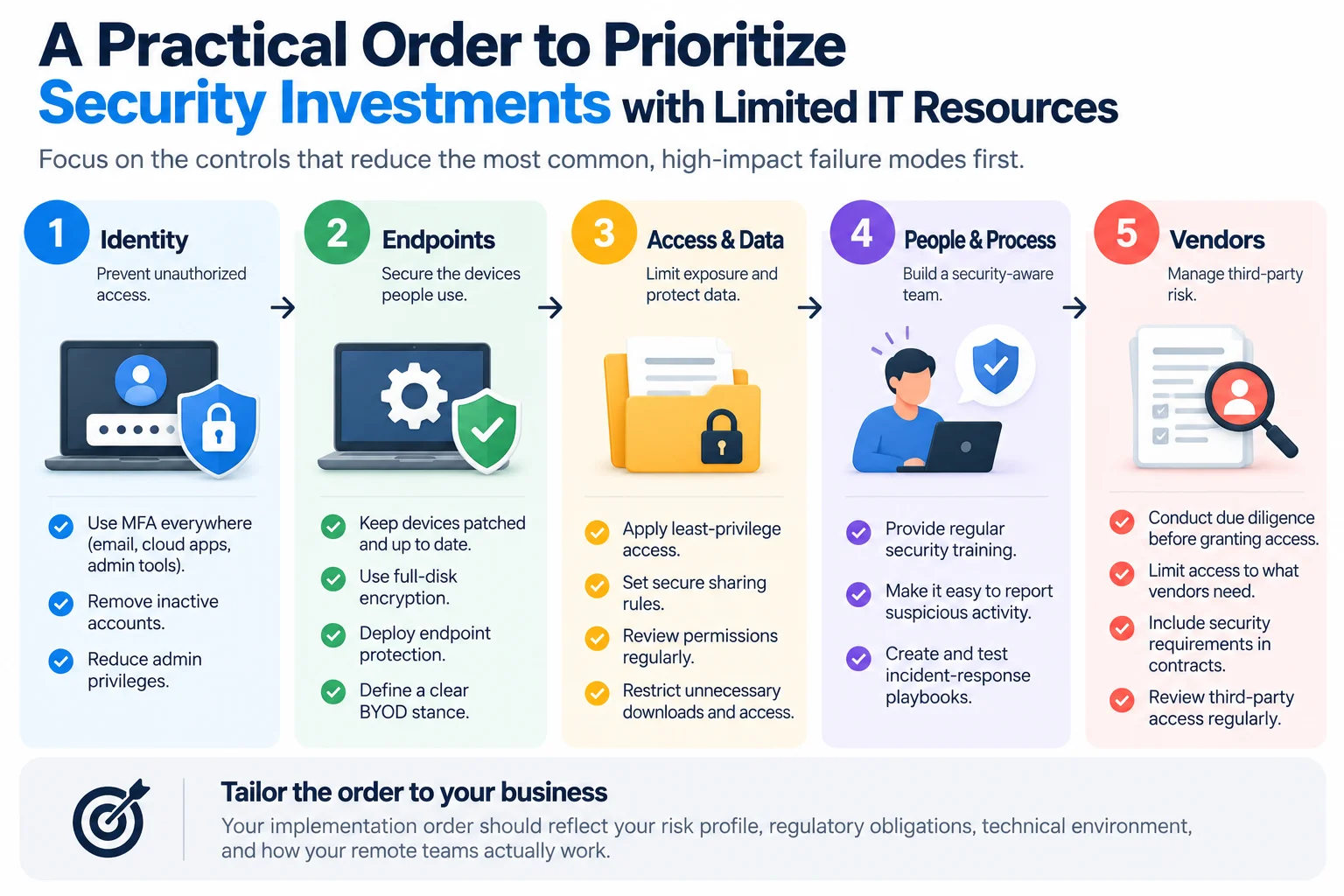
If you have limited IT resources, prioritize controls that reduce the most common, high-impact failure modes first. A practical order for many small and mid-sized businesses is:
- Identity: MFA everywhere, remove inactive accounts, reduce admin privileges.
- Endpoints: patching, encryption, endpoint protection, and a clear BYOD stance.
- Access & data: least privilege, secure sharing rules, and access reviews.
- People & process: training cadence, easy reporting, and incident-response playbooks.
- Vendors: due diligence and scoped third-party access.
Your implementation order should reflect your risk profile, regulatory obligations, technical environment, and how your remote teams actually work. Remote Raven can be a helpful partner when you want to prioritize without overbuilding—especially if you’re combining remote staffing with technology and security support.
How Remote Raven Can Help Businesses Secure Remote Work
At Remote Raven, we are a partner for companies building and operating distributed teams. Depending on your needs, Remote Raven may support parts of your remote work security program through services such as managed IT services, cybersecurity services, secure cloud workstations and virtual desktops, and remote staffing/virtual assistants.
In practice, Remote Raven’s role should complement—not replace—your internal policies, approvals, and risk decisions.
Our approach emphasizes giving remote professionals access only to the tools and information they need to perform their duties, while supporting secure working environments and clear processes. The specific safeguards depend on the services engaged and the client’s requirements. Remote Raven’s role is to complement—not replace—your internal security policies, access approvals, compliance obligations, and risk decisions. Businesses remain responsible for defining access permissions and ensuring that their security requirements are implemented and maintained.
- Managed IT services: can help with device setup standards, patch coordination, help desk support, and consistent onboarding/offboarding processes.
- Cybersecurity services: can help implement layered controls like endpoint protection, identity hardening, monitoring/alerts, and security awareness support.
- Secure cloud workstations / Virtual Desktops: can help centralize apps and data in a controlled workspace model for remote teams.
- Remote staffing and virtual assistants: can expand capacity—security improves when staffing, onboarding, and access provisioning are coordinated.
- NordPass password management: if included in Remote Raven’s current offerings, it may support consistent password practices for remote teams.
If you want a practical plan tailored to your team structure and tools, book a 30-minute free strategy call with Remote Raven
Conclusion
Remote work security works best when it’s treated as an operating system for the business: coordinated controls across people, devices, identities, data, applications, vendors, and response processes. The objective is not to “lock everything down,” but to enable productive remote work while reducing preventable security risks.
Start with foundational controls (MFA, patching, endpoint protection, access reviews, safe reporting, and an incident-response plan). Then improve steadily. If you need help balancing secure operations with distributed hiring and day-to-day IT realities, Remote Raven may be a strong partner to evaluate.
Frequently Asked Questions
Is remote work less secure than working in an office?
Remote work is not automatically less secure, but it can increase risk if identity, devices, access, and data controls are weaker outside the office. A well-run program (MFA, managed endpoints, least privilege, secure access, and training) can support secure and productive remote work.
What is the biggest security risk for remote employees?
The biggest risk is usually credential theft through phishing and impersonation. Attackers often target email and cloud logins because a single compromised account can provide access to files, customer data, and financial systems.
How can businesses protect company data when employees work remotely?
Businesses protect company data by limiting access (least privilege), securing endpoints (encryption and patching), controlling sharing/downloads, and using monitored secure access methods. Training and clear reporting procedures reduce the chance that a mistake becomes a breach.
Do remote workers need a VPN?
Remote workers don’t always need a VPN, but they do need an approved secure remote access approach. Depending on your tools and risk, that could be a properly configured VPN, a zero-trust access model, or a virtual desktop/secure cloud workstation.
Are virtual desktops more secure for remote work?
Virtual desktops can be more secure when they keep apps and data inside a controlled environment and reduce local data storage on endpoints. They still require MFA, correct configuration, session controls, monitoring, and endpoint security on the user’s local device.
What cybersecurity tools should remote employees use?
At a minimum, remote employees should use MFA, secure endpoint protection, encrypted devices, and approved secure access methods to reach company systems. Many organizations also add password managers, device management, and monitoring/alerting for key systems.
How often should remote employees receive security training?
Remote employees should receive training at onboarding and then regularly—often quarterly for reinforcement—plus targeted refreshers when threats or tools change. Short, role-specific training is usually more effective than a single annual presentation.
How can a small business secure a remote workforce without a large IT team?
A small business can secure a remote workforce by starting with MFA, basic endpoint hardening (updates and encryption), least-privilege access, a simple reporting process, and a lightweight incident-response plan. Managed IT and cybersecurity services—such as those Remote Raven offers—can help cover gaps when internal capacity is limited.